The Invisible Conductor: Understanding Operating Systems
The Invisible Conductor: Understanding Operating Systems
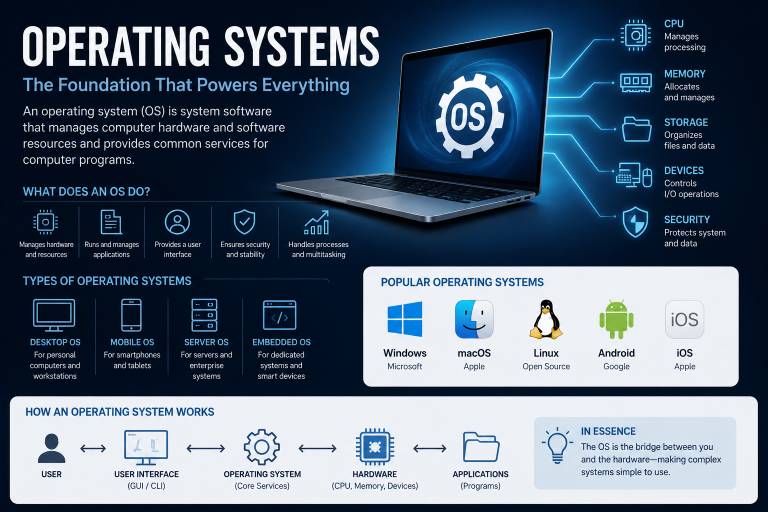
Without an operating system, a computer is basically just a costly rock. It's made up of silicon, metal, and plastic and can perform billions of calculations every second, but it can't do anything useful on its own. The Operating System (OS) gives it purpose. It acts as the main control program, like an unseen conductor guiding the complex mix of hardware and software. Every time you click an icon, type a key, or watch a video, you're actually using the OS. It sits between the apps you run and the physical parts of your computer, turning simple human commands into signals the processor can understand.
The Dual-Mode Operation: User Space vs. Kernel Space
To keep the system safe from crashes caused by bad software, modern operating systems split the computer's memory and running environment into two separate areas: User Space and Kernel Space.
User Space
This is where your apps run—like your web browser, word processor, and games. Programs in user space can't directly access hardware features. They can't read files from the hard drive, send data over the internet, or use up memory on their own. If an app in user space crashes, only that app stops working, and the rest of the system remains fine.
Kernel Space
The kernel is the core part of the operating system. It has full access to all the hardware, which means it can control everything the computer does. When an app in user space needs to do something with the hardware—like open a file—it makes a System Call. This is like asking the kernel to do the task for it. If something goes wrong in the kernel, it can cause the whole system to crash. This might look like a "Blue Screen of Death" on Windows or a "Kernel Panic" on macOS or Linux.
The Four Pillars of Operating System Management
The main job of an operating system is to manage resources. Every computer has a limited amount of CPU power, memory, and storage, but many programs are trying to use them at the same time. The OS handles this by managing four key areas.
1.Process Management
A program is just a file on your computer; a process is that file running right now. Managing processes is one of the most complicated tasks an OS has.
Modern operating systems use preemptive multitasking. This means the OS makes it look like multiple programs are running at the same time by quickly switching the CPU between them. This happens so fast—thousands of times per second—that it feels smooth to us.
The OS keeps track of each active process with a process control block (PCB), which shows the process's current state. A process can be in one of several states:
- Ready: Waiting for a turn on the CPU.
- Running: Using the CPU to run instructions.
- Waiting/Blocked: Paused, usually waiting for something like a file to load.
The OS uses a Scheduler to pick the next "Ready" process to run. It uses different algorithms to make sure everything gets fair and efficient treatment, like Round Robin, where each process gets an equal share of time, or Priority Scheduling, where important tasks get to go first.
When the OS moves one process out and another in, it performs a Context Switch. It saves the outgoing process's state—like register values and memory pointers—and loads the incoming process's state. Because this requires some processing, developers work hard to make it as fast as possible to keep the system from slowing down.
In addition, modern apps often use Threads, which are like small parts of a process. A single app, like a web browser, can have multiple threads—each handling different tasks, like downloading a file, rendering a webpage, or playing audio. The OS must manage these threads so they don’t interfere with each other and cause deadlocks, where two processes freeze because they’re both waiting for something the other is holding.
2.Memory Management
If the CPU is the brain of the computer, then RAM is its short-term memory. Every program needs RAM to work, but there’s not enough physical RAM for everything.
The OS needs to track all the memory, noting which parts are used and which are free. When you start an app, the OS gives it the memory it needs, and when you close it, that memory is reclaimed.
To help manage this, modern operating systems use Virtual Memory. This makes it seem like each app has a large, continuous block of memory, even though the actual memory is split into smaller pieces. The OS divides physical memory into frames and logical memory into pages.
When the physical RAM is full, the OS moves some pages of memory to the hard drive, a process called Swapping or Paging. When the app needs that data again, the OS handles a "page fault" and brings the data back into RAM. While this keeps things running, using the hard drive is much slower than using RAM. If the system is constantly swapping data, it leads to "thrashing," which severely slows things down.
3.File System Management
Data stored on a hard drive is just a long line of 1s and 0s. The OS structures this raw data into files and folders to make it usable.
The file system acts like an index, helping the OS find the exact place on the storage device where a file is stored. Different systems use different file systems, like NTFS for Windows, APFS for macOS, and ext4 for Linux.
Modern OSs use Journaling File Systems. Before writing data to the disk, the OS records its intention in a log (the journal). If the computer loses power while saving a file, the OS can use the journal to fix the file system when it restarts, preventing data loss.
Beyond organizing data, the file system also handles permissions and security. It controls which users or processes can read, write, or run specific files, preventing unauthorized access to sensitive information.
4. Device Management
Computers are made of different parts that work together. These parts include a mouse, keyboard, graphics card, printer, and network adapter. Each maker of these parts designs them in their own way. It's impossible for a software developer to create a program that can directly work with every printer that has ever been made.
Instead, the operating system (OS) uses device drivers to handle the hardware. A driver is a special kind of software that comes from the manufacturer. It acts like a translator. When the OS sends a command, like "print this document," the driver turns that command into the exact signals the printer needs to work.
The OS also handles interrupts. If you move your mouse, the hardware sends a signal to the CPU. The OS catches this signal, stops what it's doing, processes the movement to update the cursor on the screen, and then goes back to what it was doing. Today's computers rely on Plug and Play (PnP) technology, which lets the OS automatically detect new hardware, find the right driver, and set up the device without needing to restart the system or do anything manually.
Kernel Architectures: How the Core is Built
Different operating systems work differently inside. The kernel architecture decides how well the system runs and how stable it is.
- Monolithic Kernel: In this setup, all the main OS services—like file management and device drivers—run together in the same privileged area called kernel space. The big benefit is speed because there's little overhead between parts of the OS. But the downside is that a small bug in a driver can crash the whole system. Linux and MS-DOS are examples of monolithic kernels.
- Microkernel: This approach is the opposite. Only the most basic functions, such as process scheduling and memory management, run in kernel space. Other services are run as normal apps in user space. This makes the system more secure and stable because if a driver crashes, it just restarts like a regular app without harming the OS. The trade-off is that it's slower because the system has to constantly pass messages between user and kernel space. MINIX and QNX use this architecture.
- Hybrid Kernel: Most modern commercial operating systems use a mix of both approaches. Core functions run in kernel space for speed, but less important services and some drivers run in user space to keep the system stable. This balance offers performance and modularity, though it's very complex to design and maintain. Both Windows NT (which is the base of modern Windows) and macOS use a hybrid kernel.
The Evolution of Operating Systems
Operating systems have developed a lot along with the hardware they control.
The 1950s: Batch Processing
Back in the 1950s, mainframe computers had no operating system. Operators would load punch cards one at a time. The very first OSs just made it easier to switch between tasks. A batch of jobs was loaded onto magnetic tape, and the OS ran them one after another, making the expensive machines work more efficiently.
The 1960s-70s: Time-Sharing and UNIX
As computers became faster, running them for just one task at a time wasn't efficient. Time-sharing systems were created, allowing multiple users at different terminals to connect to a single mainframe. The OS quickly switched between users, making it feel like each user had their own machine. This era gave rise to UNIX, which introduced ideas like hierarchical file systems and the command-line interface.
The 1980s-90s: The GUI Revolution
Computers moved from labs to offices and homes. The command-line interface was too hard for average users. Operating systems started to use graphical user interfaces (GUIs), with windows, icons, menus, and pointers. Apple's classic Mac OS and Microsoft's Windows changed personal computing by making complex tasks easy with clicks. Meanwhile, Linus Torvalds developed Linux, an open-source, UNIX-like OS that became the foundation of the modern internet.
The 2000s and Beyond: Mobile and Cloud
As hardware got smaller, smartphones emerged, which needed new types of OS. Mobile OSs like iOS and Android focus on saving power, managing background processes to keep batteries alive, and securing user data with strict sandboxing.
Modern Challenges and Future Trends
Operating systems are no longer just about managing a single computer under a desk. They are evolving to handle complex, distributed, and high-stakes environments.
Virtualization and Containers
In the past, one computer ran one OS. Now, hypervisors let a single server run multiple OSs at the same time as virtual machines (VMs).
Going further, modern software uses containers like Docker. Instead of running a full virtualized OS, containers share the host's OS kernel but keep applications and their dependencies separate. Modern OS kernels must manage these complex spaces and isolated resources, ensuring thousands of containers can run on a single server without getting in each other's way.
Security and Sandboxing
As cyber threats get more advanced, modern OSs are using a "zero-trust" method. Instead of giving apps full access just because the user started them, OSs use strict sandboxing. When you install an app on iOS, macOS, or Windows 11, it runs in a separate, secure environment. If the app is hacked, the attacker is stuck within that space and can't access the rest of the system, the webcam, or personal data.
The Internet of Things (IoT) and Edge Computing
The future of OS development is changing to meet different needs. On one side, server OSs are becoming huge cloud platforms that manage thousands of machines like one big system.
On the other side, small devices such as smart thermostats, medical implants, and industrial sensors need Real-Time Operating Systems (RTOS). Regular operating systems focus on fairness, making sure every task gets a chance to run, but an RTOS ensures that a crucial, high-priority task is done within a specific and predictable time. This is vital in situations where timing is everything—like if an autonomous car's braking system is delayed because the operating system's scheduling is slow, it could cause a deadly accident.
Conclusion
The operating system is the hidden hero of computing. It's a huge achievement in software engineering, with tens of millions of lines of code, but its main job is to stay out of sight. By handling the complicated needs of hardware, keeping security strong, and offering a reliable base for apps, the OS turns raw electricity into the smooth digital experiences we use every day.