JPEG Format: History, Mechanics, and Digital Legacy
The JPEG format, commonly recognized through the file extensions .jpeg and .jpg, is one of the most influential digital imaging standards ever created. For more than three decades, it has served as the backbone of digital photography, web publishing, social media, and image sharing across the globe. Despite the emergence of newer image formats such as WebP, AVIF, and HEIC, JPEG remains one of the most widely supported and recognizable file formats in computing history.
Its success stems from a simple yet powerful idea: reduce image file sizes dramatically while preserving enough visual quality that most viewers cannot easily notice the difference. This balance between quality and efficiency transformed how images are stored, transmitted, and consumed in the digital age.
Origins of JPEG
JPEG stands for Joint Photographic Experts Group, the international committee responsible for developing the standard. During the 1980s, computer systems were rapidly becoming more capable, but storage space and network bandwidth remained extremely limited. Digital images required large amounts of data, making them difficult to store and share.
Recognizing this challenge, experts from the International Organization for Standardization (ISO) and the International Telecommunication Union (ITU) formed the Joint Photographic Experts Group to create an efficient image compression standard.
The first JPEG specification was officially published in 1992. It quickly gained widespread adoption because it allowed photographic images to be compressed to a fraction of their original size without causing severe degradation in visual appearance.
Why JPEG Became Popular
Several factors contributed to JPEG's extraordinary success:
Efficient Compression
JPEG significantly reduces image file sizes compared to uncompressed formats such as BMP. A photograph that might occupy several megabytes in raw form can often be compressed to only a few hundred kilobytes.
Broad Compatibility
Virtually every operating system, web browser, smartphone, digital camera, and image editor supports JPEG. This universal compatibility helped establish it as a default image format.
Suitable for Photographs
JPEG excels at handling photographs containing millions of colors, subtle gradients, and complex visual details. It performs especially well on natural scenes, portraits, landscapes, and everyday photography.
Faster Sharing
Smaller file sizes meant faster uploads, downloads, and email attachments, particularly during the era of dial-up internet connections.
How JPEG Compression Works
The defining feature of JPEG is its lossy compression algorithm. Unlike lossless formats, JPEG intentionally discards some image information to achieve smaller file sizes.
This process involves several stages.
Color Space Conversion
Digital images are often stored using RGB (Red, Green, Blue) color values. JPEG converts these values into a color space called YCbCr.
In this system:
- Y represents brightness (luminance)
- Cb represents blue color differences
- Cr represents red color differences
Human vision is more sensitive to brightness than color detail, allowing JPEG to reduce color information without noticeably affecting perceived image quality.
Chroma Subsampling
JPEG often stores less color information than brightness information through a technique known as chroma subsampling.
Since the human eye is less sensitive to color detail, this reduction provides significant compression benefits while maintaining visual fidelity.
Block Division
The image is divided into small 8×8 pixel blocks. Each block is processed independently.
This approach simplifies calculations but can sometimes produce visible artifacts at low quality settings.
Discrete Cosine Transform
Each 8×8 block undergoes a mathematical operation called the Discrete Cosine Transform (DCT).
The DCT converts pixel values into frequency components, separating important visual information from fine details that may be less noticeable.
Quantization
Quantization is the stage where most data reduction occurs.
Less important frequency information is rounded or discarded, reducing the amount of data needed to represent the image. Higher compression levels result in more aggressive quantization and lower image quality.
Entropy Encoding
Finally, the compressed data is encoded using techniques such as Huffman coding, which further reduces file size by efficiently storing repeated patterns.
JPEG Quality Settings
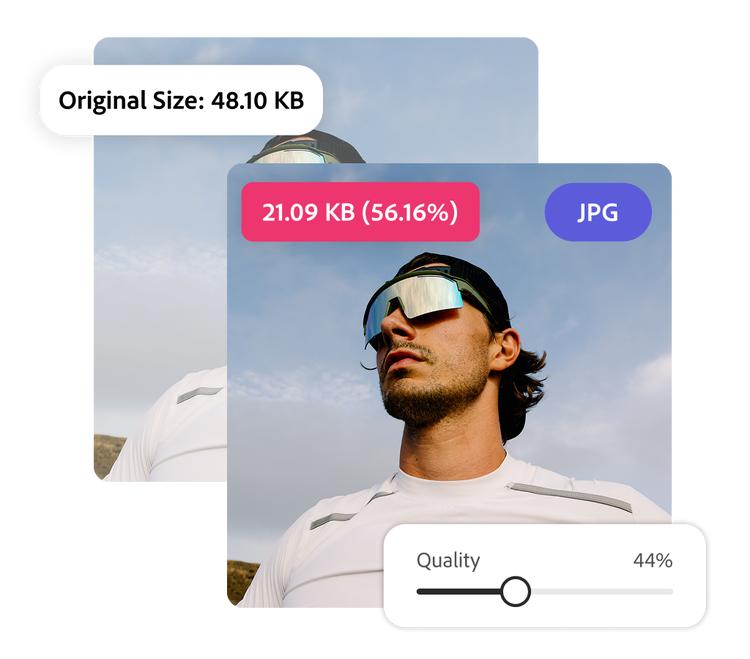
One of JPEG's most useful features is adjustable quality.
Most image editors allow users to choose a quality level when saving JPEG files.
Higher quality settings:
- Produce larger files
- Preserve more detail
- Introduce fewer artifacts
Lower quality settings:
- Produce smaller files
- Increase compression
- May create visible distortions
Finding the right balance between quality and file size remains a common consideration for photographers, web developers, and content creators.
Advantages of JPEG
Excellent Compression Ratios
JPEG can reduce file sizes dramatically while maintaining visually acceptable results.
Universal Support
Support for JPEG exists across virtually all hardware and software platforms.
Ideal for Photography
The format is optimized for photographic content with smooth gradients and natural colors.
Fast Processing
JPEG files can be quickly decoded and displayed, making them suitable for web browsing and digital photography workflows.
Efficient Storage
The format helps conserve storage space on devices ranging from smartphones to cloud servers.
Limitations of JPEG
Despite its popularity, JPEG has several weaknesses.
Lossy Compression
Every time a JPEG image is saved with compression, some information may be lost.
Repeated editing and saving can gradually degrade image quality.
Compression Artifacts
High compression levels can introduce visible defects such as:
- Blockiness
- Blurring
- Ringing effects
- Color distortions
No Transparency Support
Unlike PNG, JPEG does not support transparent backgrounds.
Poor Choice for Graphics
Images containing text, logos, sharp edges, or diagrams may appear blurry or distorted when saved as JPEG.
Limited Dynamic Range
Traditional JPEG was designed for standard image ranges and struggles to preserve extreme brightness and shadow detail compared to newer formats.
JPEG Versus Other Image Formats
JPEG vs PNG
PNG uses lossless compression and preserves every pixel of the original image.
PNG is ideal for:
- Logos
- Screenshots
- Graphics
- Images requiring transparency
JPEG is generally better for photographs because it produces much smaller file sizes.
JPEG vs GIF
GIF supports animation but is limited to 256 colors.
JPEG provides significantly better quality for photographic content.
JPEG vs WebP
WebP often delivers better compression efficiency than JPEG while maintaining comparable image quality.
However, JPEG still enjoys broader compatibility.
JPEG vs AVIF
AVIF can achieve substantially smaller file sizes and better quality than JPEG.
Despite these advantages, JPEG remains dominant due to its widespread support and established ecosystem.
JPEG in the Internet Era
The rise of the World Wide Web greatly accelerated JPEG adoption.
Websites needed images that could load quickly even over slow internet connections. JPEG's compression capabilities made it the perfect solution.
As digital cameras became mainstream in the late 1990s and early 2000s, JPEG emerged as the standard output format. Millions of users could capture, store, and share photographs without requiring large amounts of storage.
Social media platforms further reinforced JPEG's importance. Services such as photo-sharing websites, messaging applications, and social networks relied heavily on JPEG compression to handle enormous volumes of image uploads efficiently.
The Future of JPEG
Although newer formats continue to emerge, JPEG remains deeply embedded in digital infrastructure. Billions of existing images use the format, and nearly every device supports it by default.
Modern successors such as JPEG XL seek to improve upon the original standard by offering better compression, higher quality, and advanced features while maintaining compatibility with existing workflows.
Nevertheless, the original JPEG format continues to thrive because of its simplicity, reliability, and universal acceptance.
Conclusion
JPEG is more than just a file format—it is a foundational technology that helped make digital photography and internet image sharing practical on a global scale. By introducing efficient lossy compression, JPEG enabled photographs to be stored, transmitted, and viewed with unprecedented convenience.
Even as modern alternatives offer improved performance, JPEG's combination of quality, efficiency, and universal compatibility ensures its continued relevance. Its legacy can be seen in billions of photographs stored on computers, smartphones, websites, and cloud services around the world, making it one of the most influential digital standards ever created.